Koine Labs

Mentat

The telepathic mouse.

What we are trying to do

Build the interface for the age of AI agents.

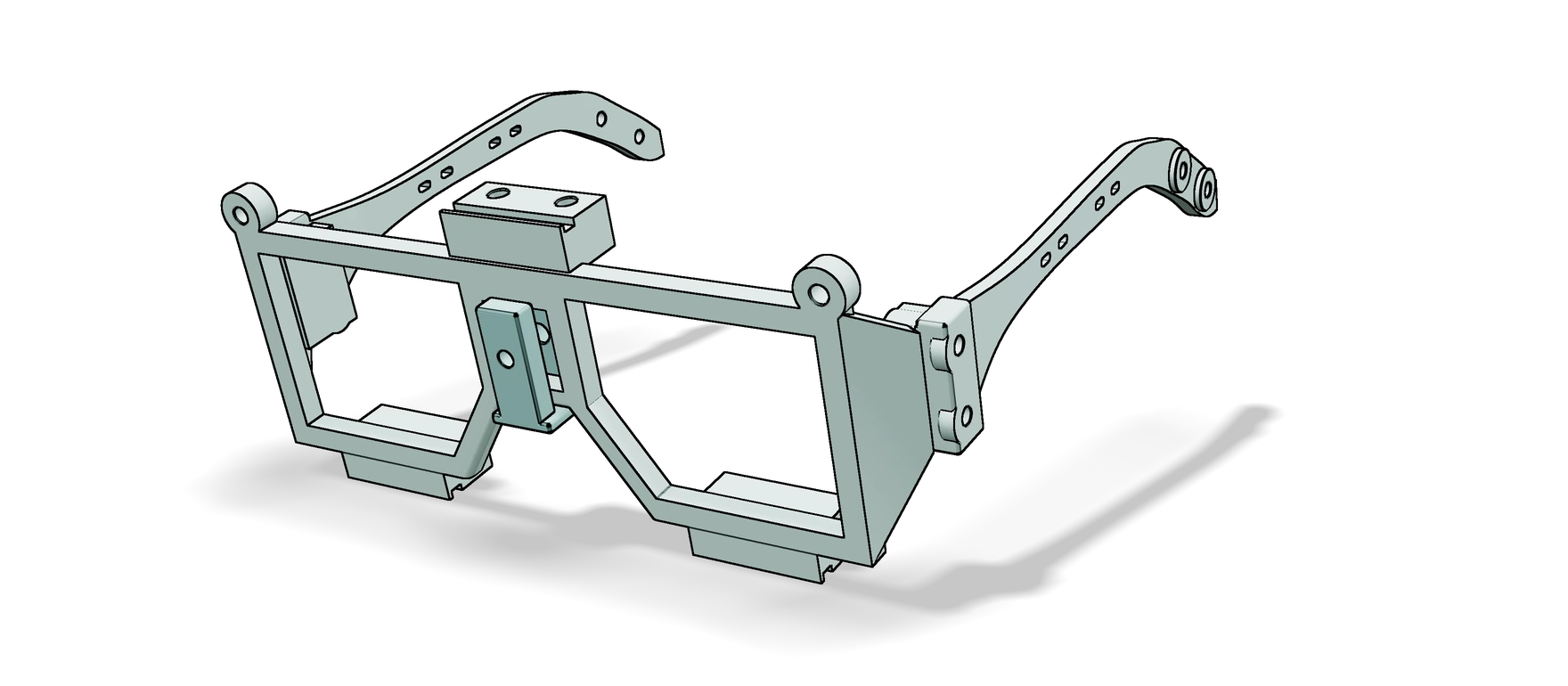
The Mentat frame, drawn from its design files: an angular frame worn like glasses. A mount on top of the bridge takes the forward camera, a mount under each lens opening takes an eye camera, and there is a nose support and two arms.

What it is today

Mentat is a research prototype. The software can already tell roughly where on a screen you are looking, using an iPhone and a webcam.

The frame above is today's prototype. It is printed in plastic, worn like glasses, and made to carry its own cameras. Looking and tapping to direct an agent is designed, and not built yet.
In line with the North Star

Agents now do much of the acting. They can only shape the future you want if they know what you intend, at the moment you intend it. Mentat is that link.

How it helps you

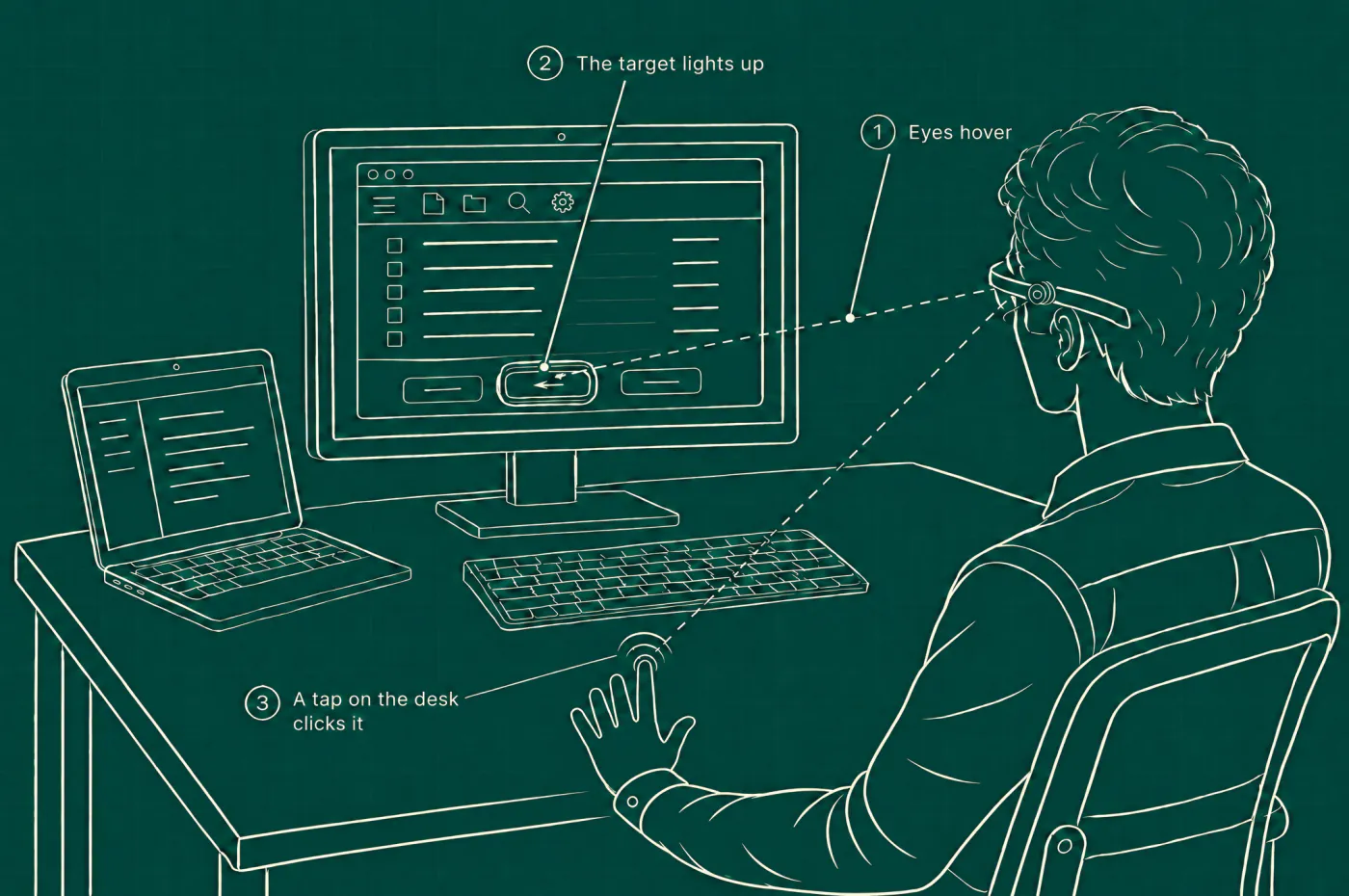
Line drawing of a person at a desk with a monitor and a laptop, seen from behind, wearing the frame. A line runs from their eyes to one button on the monitor, which is lit. Their left hand lies open on the bare desk, palm down, and the index finger taps it. Labels: 1, eyes hover. 2, the target lights up. 3, a tap on the desk clicks it.
How it would work at a desk. Your eyes rest on the button you mean and it lights up. One tap of a finger on the desk clicks it.
Point by looking
Your eyes are already on the thing you mean. Mentat uses that, so there is nothing to reach for and no pointer to steer.
Agents that know what you mean
Glance at a paragraph, a file or a button and say what you want. The agent knows what "this" is, so you never have to describe it.
Nothing happens by accident
Looking only points. Nothing is clicked or sent until your hand acts.
No screen on your face
Mentat works with the screens you already own. It adds no display and no lenses.
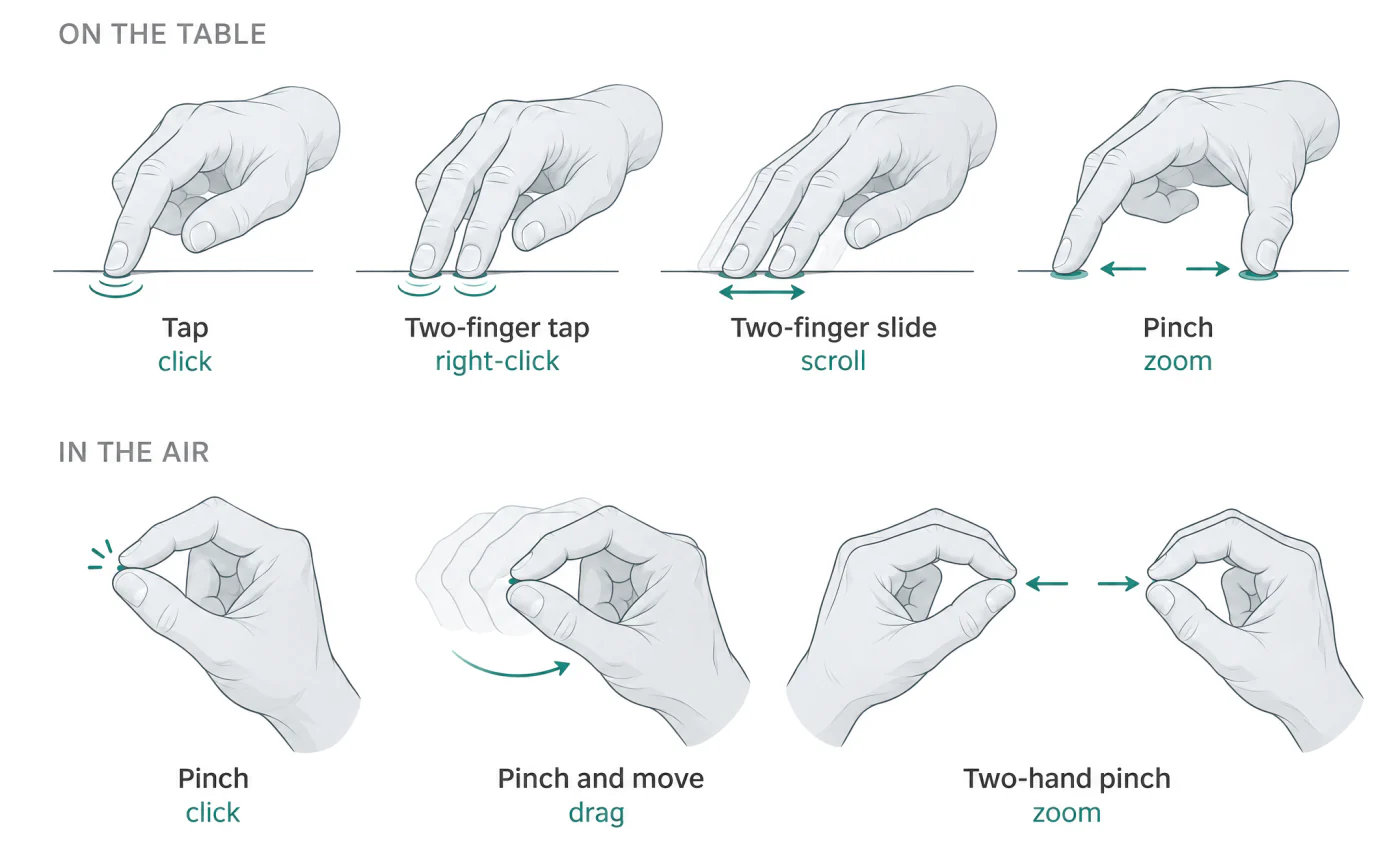
Seven hand gestures. On the table: tap to click, two-finger tap to right-click, two-finger slide to scroll, pinch to zoom. In the air: pinch to click, pinch and move to drag, two-hand pinch to zoom.
The hand does the acting, on a table or in the air. These are the gestures as designed.

What we want to build

These are design drawings of what we are working toward. None of it is built yet.

What it will do

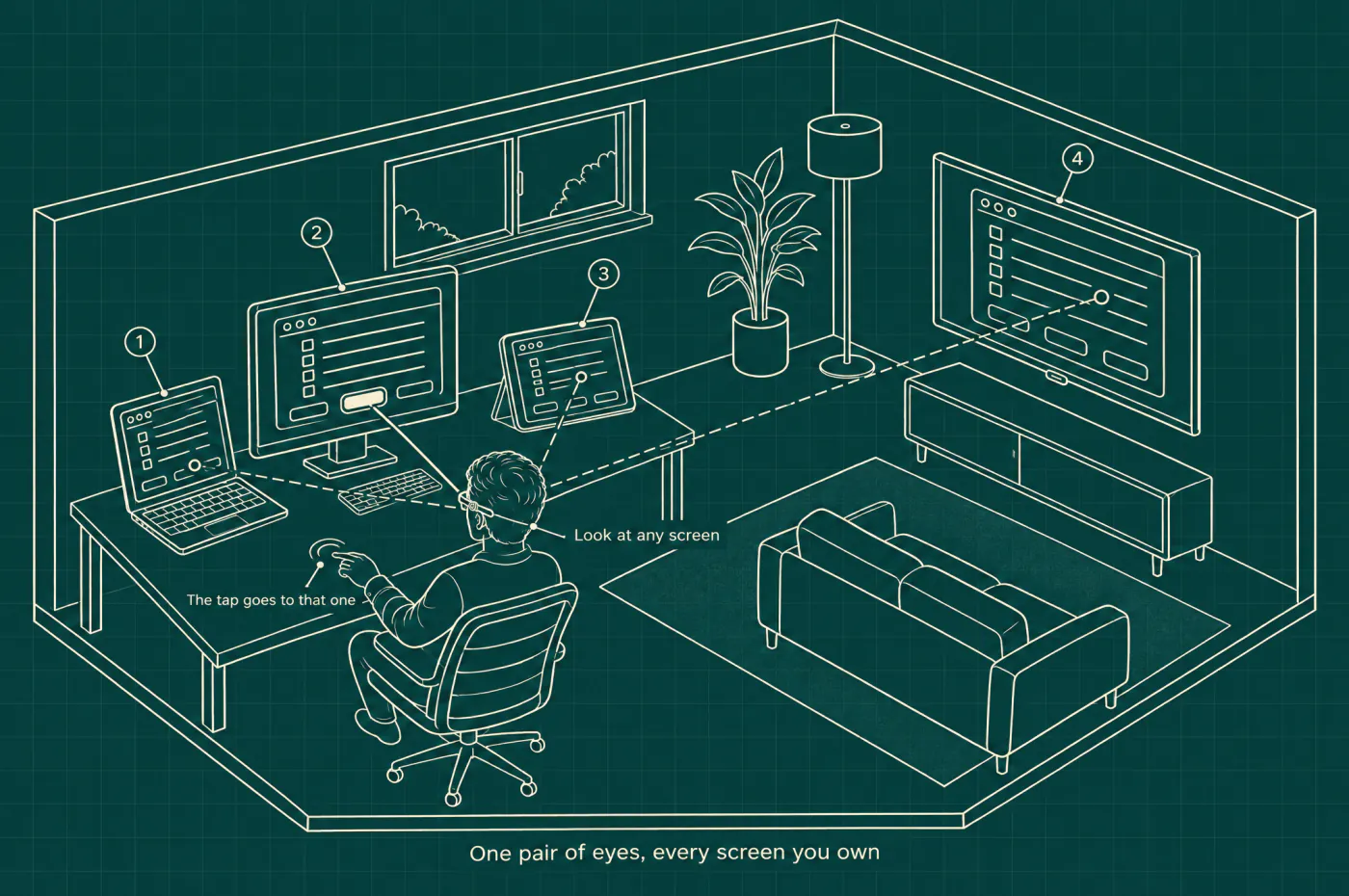
Works on every screen you own
Glance from a laptop to a monitor to another computer and carry on working.
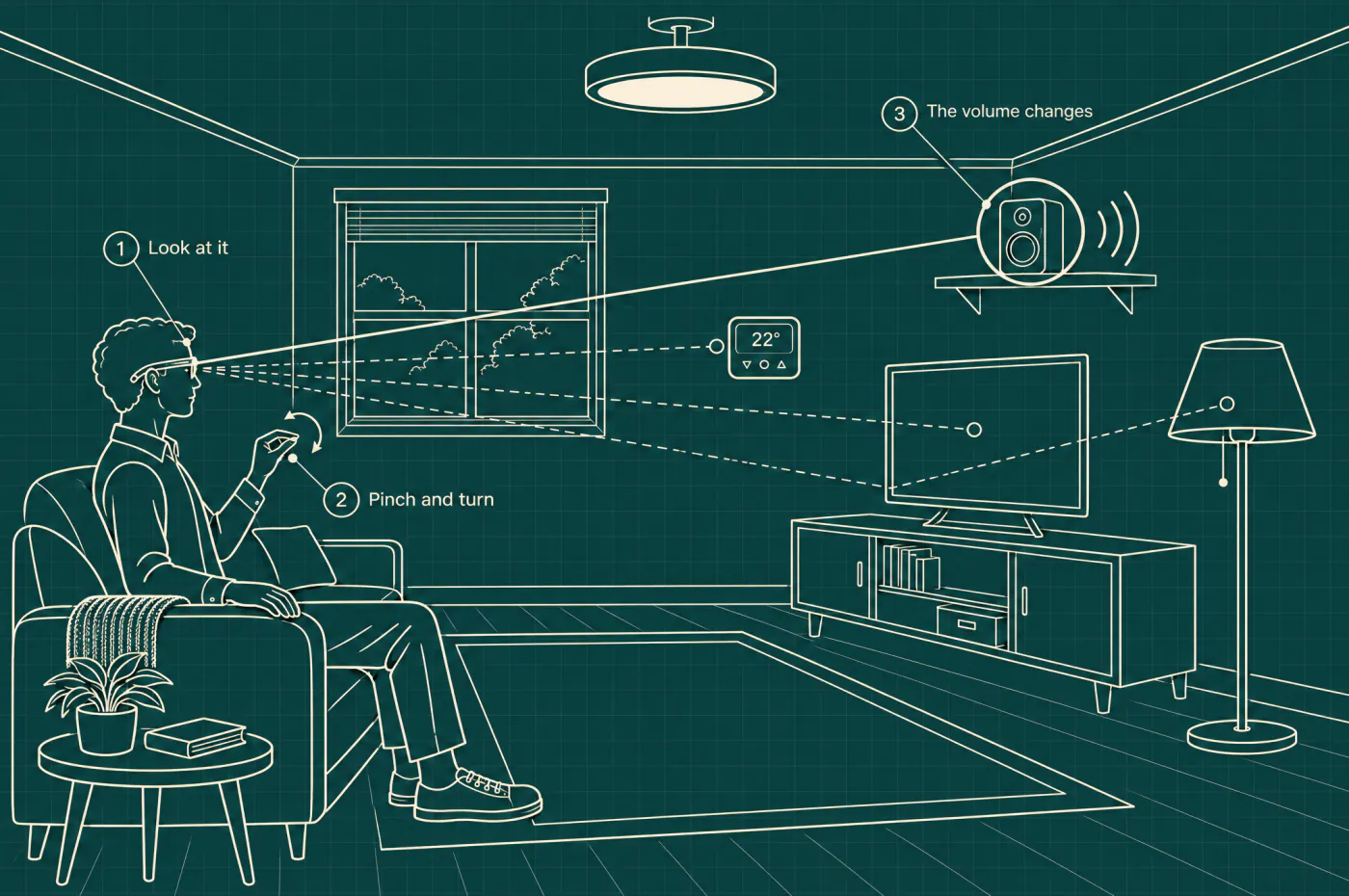
Reaches beyond screens
Look at a speaker or a lamp and adjust it, through the phone or computer that already controls it.
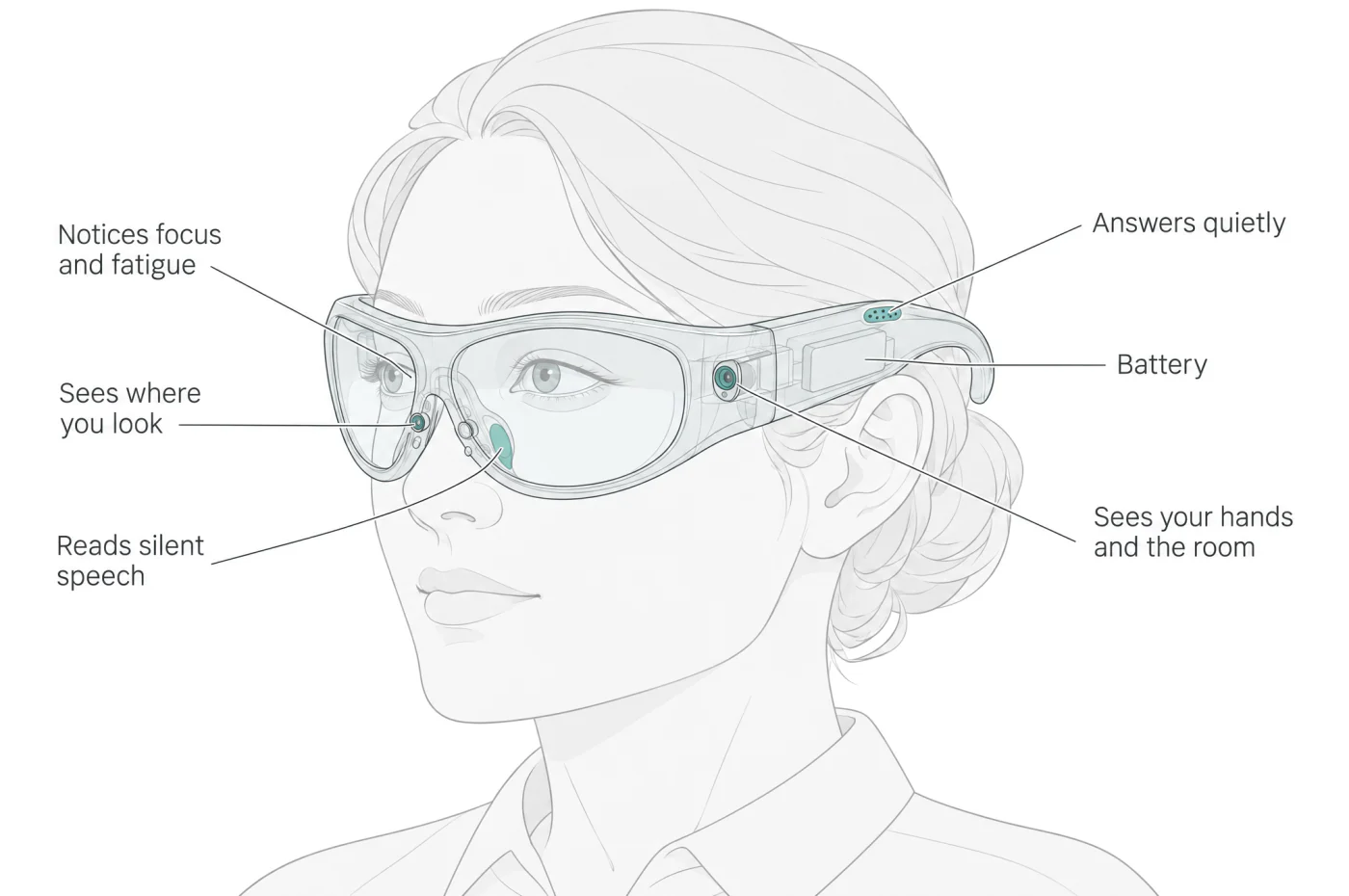
Follows your hands
Cameras on the frame see your hands and the things around you, so a small gesture is enough.
Hears silent speech
Form words without saying them aloud, from the lab's earlier work on Wisp.
Senses how you are doing
Tiredness and focus read from the body, from the lab's earlier work on Daybook.
Answers quietly
Sound built in, so an agent can reply with nothing in your ears.
Line drawing of a home studio seen from above with two walls cut away. A person wearing the frame sits at a desk. A laptop, a monitor and a tablet stand on the desk and a television hangs on the far wall, numbered one to four. A solid line runs from their eyes to a lit button on the monitor, and dashed lines reach the other three screens. Their hand taps the desk. Labels: look at any screen; the tap goes to that one. Written along the bottom: one pair of eyes, every screen you own.
Every screen you own. Look at the laptop, the monitor, the tablet or the television, and your tap goes to that one.
Line drawing of a living room. A person on a sofa wearing the frame looks at a speaker on a shelf, which is circled, and turns a pinched hand. Labels: 1, look at it. 2, pinch and turn. 3, the volume changes. Dashed lines reach a thermostat, a television and a lamp.
Beyond screens. Look at the speaker, pinch and turn your hand, and the volume changes. The lamp, the television and the thermostat would work the same way.
Line drawing of a head wearing the wraparound frame, with six labels: sees where you look, notices focus and fatigue, reads silent speech, answers quietly, battery, sees your hands and the room.
What the frame would sense. Where each part sits is not decided, so the positions drawn here are placeholders.
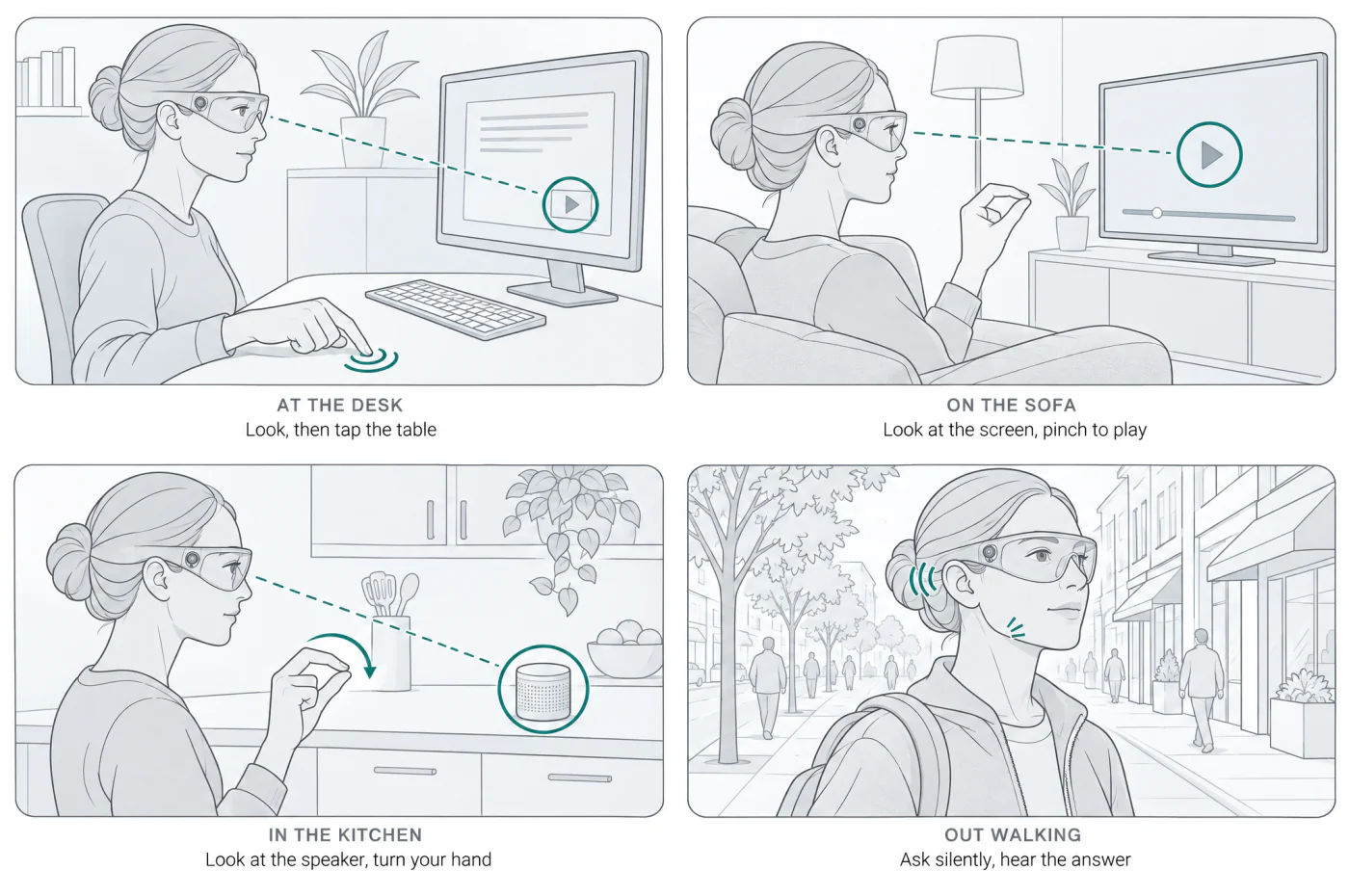
Four scenes of one person wearing the frame. At the desk: look, then tap the table. On the sofa: look at the screen, pinch to play. In the kitchen: look at the speaker, turn your hand. Out walking: ask silently, hear the answer.
A day with it: at the desk, on the sofa, in the kitchen and out walking.

Three forms we are considering

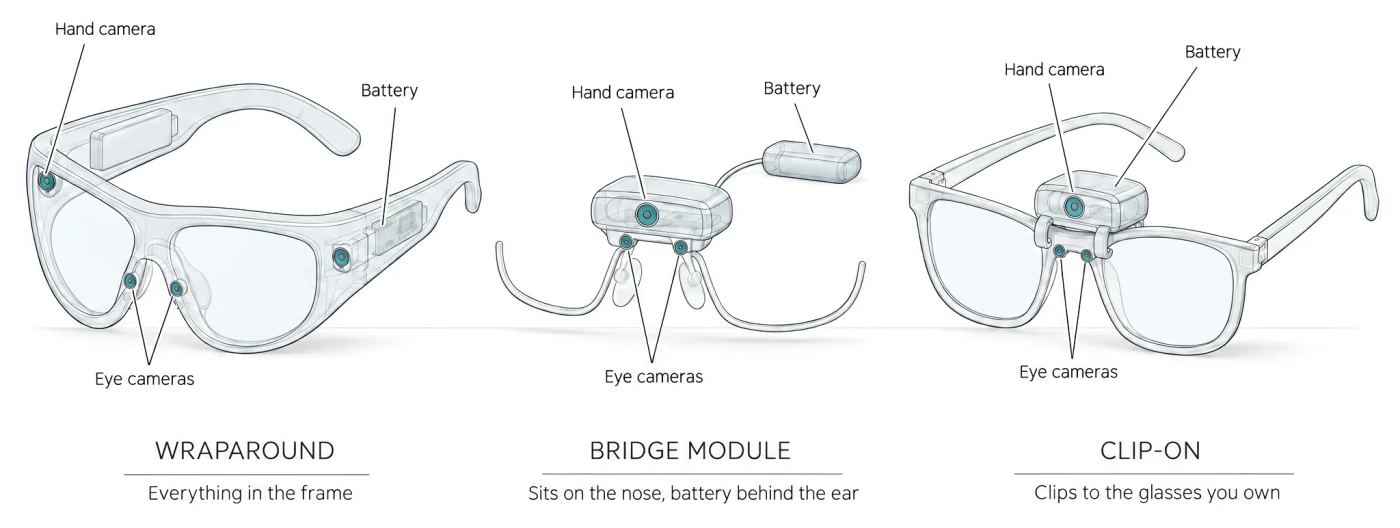
Three devices drawn side by side, each labelled with its eye cameras, hand camera and battery. Wraparound: everything in the frame. Bridge module: sits on the nose, battery behind the ear. Clip-on: clips to the glasses you own.
Wraparound frame
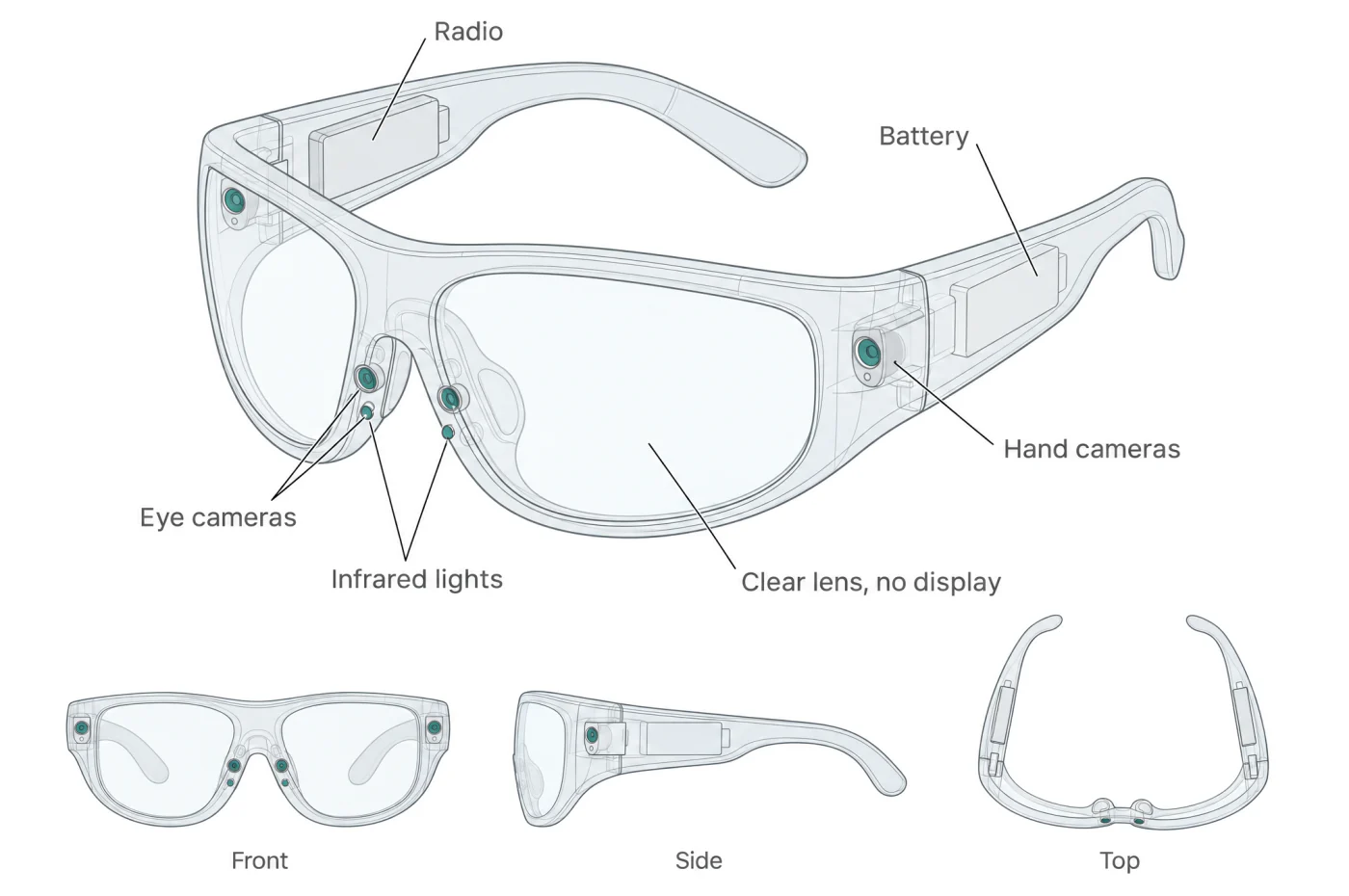
A full frame with nothing in front of the eyes: no display and no lenses. The battery and the radio sit in the arms.
Bridge module
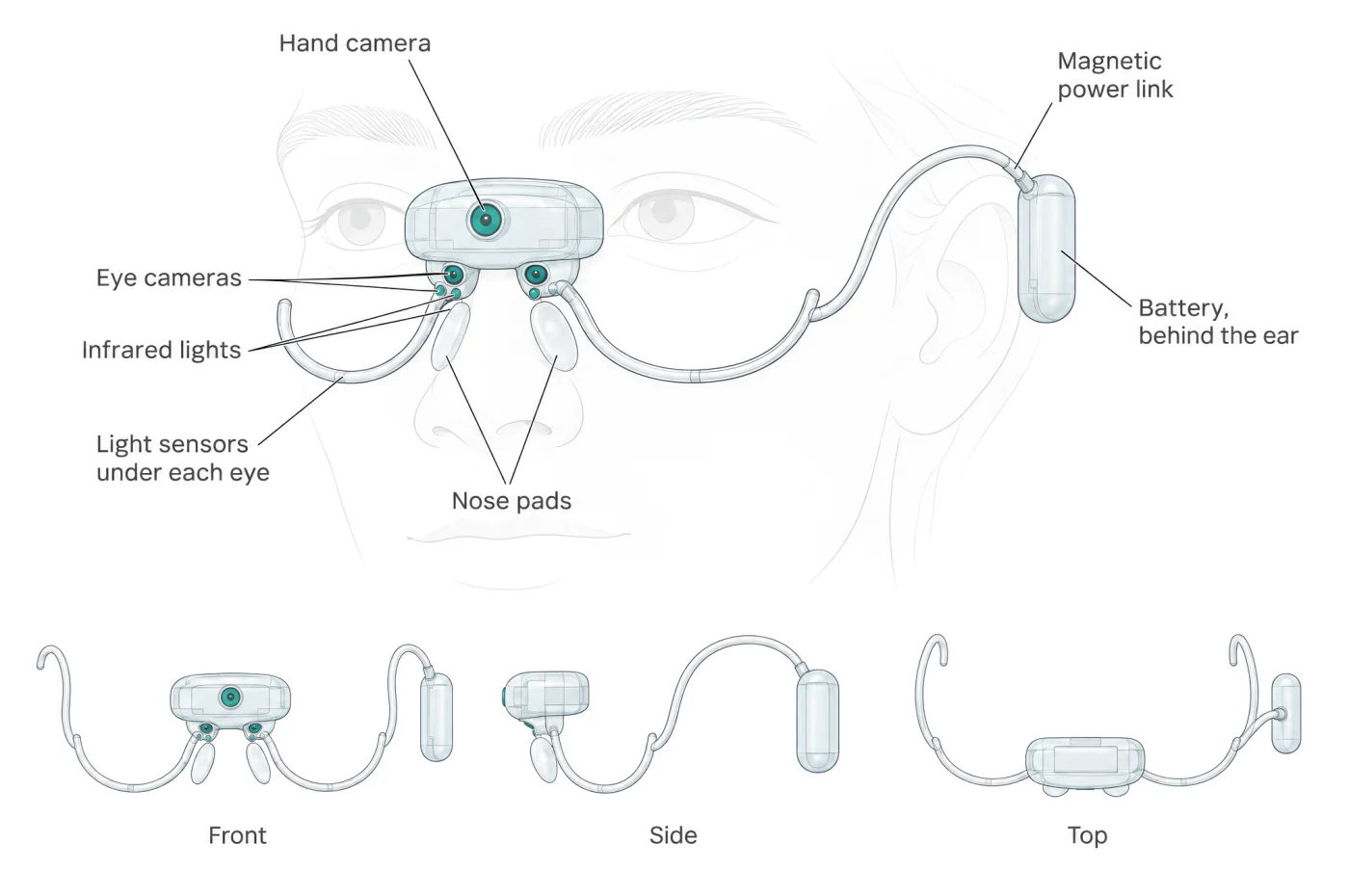
A few grams on the bridge of the nose and nothing else on the face. The battery is worn behind the ear or as a pendant.
Clip-on
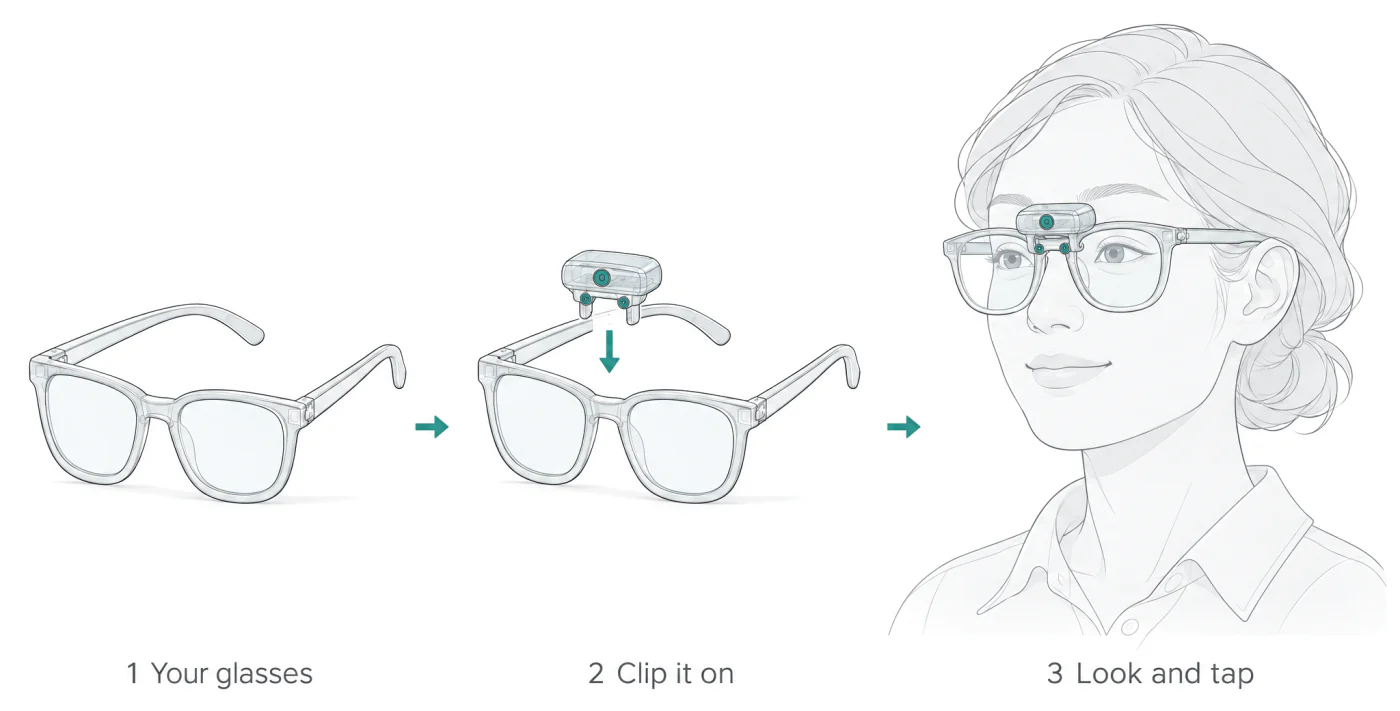
Clips onto the glasses you already wear, for the many people who wear them.
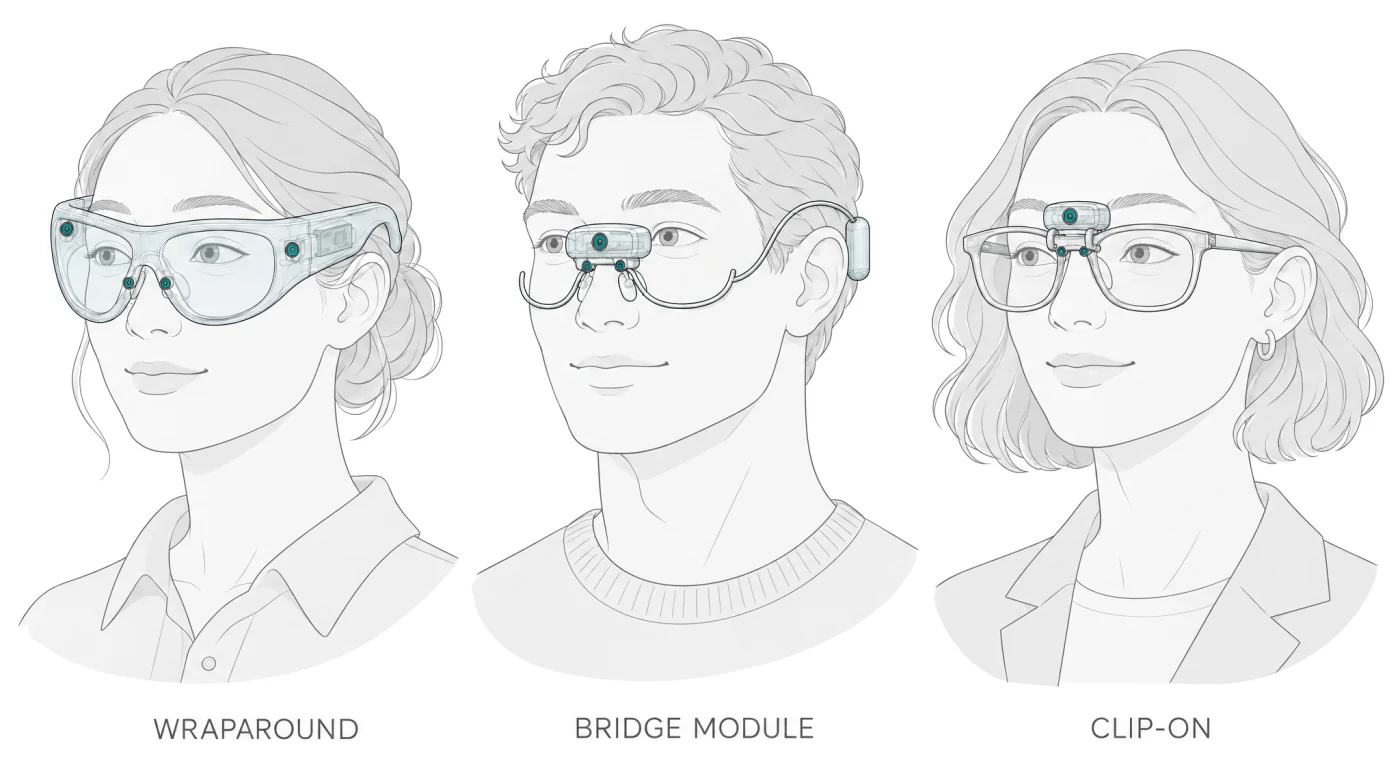
Three line-drawn portraits. One person wears the wraparound frame. One wears the bridge module, with a small battery behind the ear. One wears ordinary glasses with the clip-on module on the bridge.
How each one would sit on the face.

A closer look at each

Design sheet for the wraparound frame. A large three-quarter view is labelled: eye cameras, infrared lights, hand cameras, battery, radio, and a clear lens with no display. Below it are views from the front, the side and above.
The wraparound frame, with views from the front, the side and above.
Design sheet for the bridge module, drawn in place on the faint outline of a face. A small pod sits on the bridge of the nose. Labels: hand camera, eye cameras, infrared lights, light sensors under each eye, nose pads, magnetic power link, and battery, behind the ear. Below it are views from the front, the side and above.
The bridge module. A small pod rests on the nose, with no lenses and no frame around the eyes. A thin wire curves under each eye, and the battery sits behind the ear.
Three steps. One: an ordinary pair of glasses. Two: the small module about to clip onto the bridge. Three: a person wearing the glasses with the module in place. Labels: your glasses, clip it on, look and tap.
The clip-on. It clips to the bridge of the glasses you already wear.

Where it is going

A device light enough to forget you are wearing it, and a way of working where you imply an intention and it is carried out.

Stage
Research prototype
Kind
Hardware and software
Started
October 2026

Stay in touch